
Short one today, but trust me – it’s useful.
Have you ever logged into a WordPress site, then clicked “Visit Site” in the upper left-hand corner of your dashboard, only to find that the familiar WordPress admin bar is missing when you’re viewing pages? Specifically, that’s the toolbar you’ll see at the top of this browser shot:
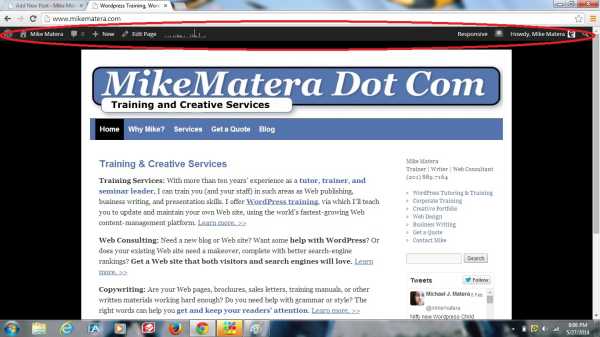
If it’s missing, where did it go?
Just go into Users >> Your Profile, along the left-hand side of the dashboard navigation panel. In the middle of the page, you’ll see that there’s a checkbox labeled “Show toolbar when viewing site”. Make sure that box is checked, as it is in the following browser image:
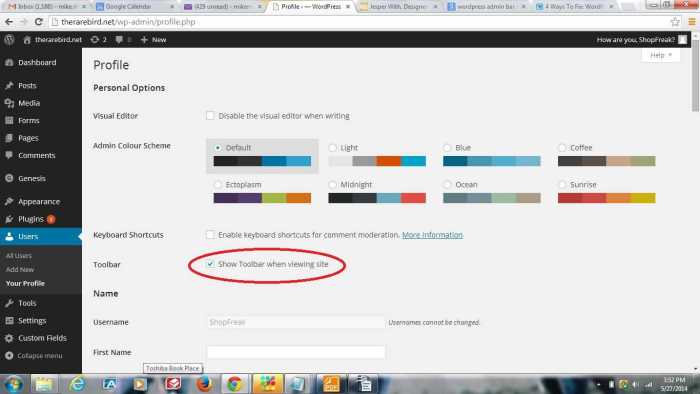
That should fix the problem. If, however, the problem persists, you may have to reinstall WordPress (not as hard as you’d think – you can do it right from the Updates tab), or edit one of your configuration files (requires a bit of advanced knowledge).
Sup gamers! Checked out wjcasino97. They have a decent selection of slots and some live dealer games. Could be a fun night in. Check it out yourself here: wjcasino97
Just found this between classes! The Maya integration looks legit for fast withdrawals. I’ll definitely check out legend link maya games to try their slots before heading home.
This is a great reminder that even small UX glitches, like a missing toolbar, can disrupt the entire user flow. It highlights how critical robust configuration and seamless accessibility are, whether managing a CMS or delivering a high-stakes experience through a platform like the phpfamous app. Attention to detail truly elevates the digital product.